Import from web and social
Bring supported recipes into Mise from websites, Instagram, TikTok, and Pinterest.
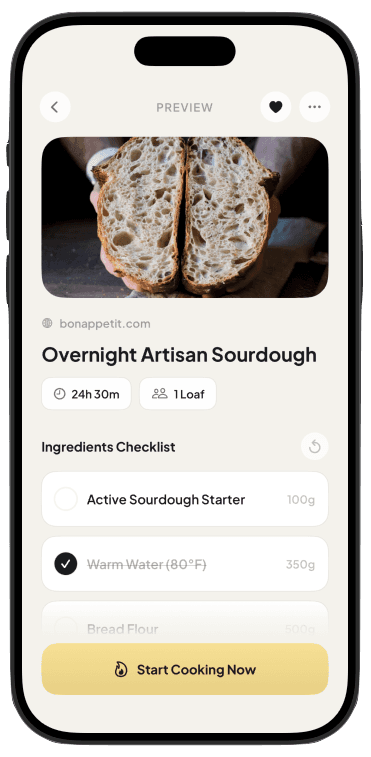
Import recipes from websites, Instagram, TikTok, and Pinterest. Mise turns them into clean, step-by-step cooking guidance on your wrist or iPhone Lock Screen.
Download on theApp Store

Mise is free to download for iPhone and Apple Watch. Apple Watch is optional, and Mise requires iOS 17 or later. Pro unlocks unlimited web and social recipe imports with a 7-day free trial.
Find a recipe on a website, Instagram, TikTok, or Pinterest. Open the iOS share sheet and choose Mise.
Check the extracted ingredients and ordered instructions against the original recipe before cooking.
Start on iPhone, then follow the current step on Apple Watch or keep it available on your iPhone Lock Screen.
Mise prepares the recipe on iPhone, then sends active cooking to Apple Watch for more glanceable guidance during the messy part of cooking. Apple Watch is preferred, not required.
Mise is built for people who already find great recipes. It turns supported sources into something easier to review, prepare, and follow while cooking.
Bring supported recipes into Mise from websites, Instagram, TikTok, and Pinterest.
Review ingredients and check them off as you shop, gather, and prepare for cooking.
Move through ordered instructions on iPhone, Apple Watch, or your iPhone Lock Screen.
Practical guides for importing supported recipes and following them with less phone touching.
Put the current recipe step on your wrist so your iPhone can stay away from the cutting board, sink, and stovetop.
Read guide →hands-free cooking appCook with fewer unlocks, scrolls, and screen touches by keeping the current recipe instruction on the surface that fits the moment.
Read guide →import recipes from websitesSave the useful cooking information from a recipe page while keeping the original publisher attached for reference.
Read guide →save recipes from InstagramMove a recipe out of a crowded Saved collection and into a structure you can review, find, and follow while cooking.
Read guide →Straight answers about imports, Apple Watch, social sources, and cooking with less phone touching.
Download on theApp StoreImport and review the recipe on iPhone first, then start cooking and send the active session to Apple Watch. Mise shows the current instruction with simple forward and back controls.
Learn how to follow recipes on Apple Watch →Mise reduces phone touching by moving the current instruction to Apple Watch or the iPhone Lock Screen. It is designed for fewer unlocks and scrolls, not full voice control.
Learn about hands-free cooking →Yes. Open a supported recipe page, tap Share, and choose Mise. Review the resulting ingredients and ordered steps against the original before cooking.
Learn how to import website recipes →Share a supported public Reel or post directly to Mise. When the caption or linked page contains enough recipe information, Mise prepares a cooking version for you to verify.
Learn how to save Instagram recipes →Mise can use available public text and direct recipe links from supported TikToks. Short videos may omit important details, so always compare the result with the creator's source.
Learn how to save TikTok recipes →Yes, for supported recipe Pins. When the Pin leads to a complete publisher page, use that page to verify the ingredients and instructions.
Learn how to import Pinterest recipes →Yes. After you review the complete recipe, cooking mode focuses the current instruction and lets you move forward or backward on iPhone or Apple Watch.
Learn about step-by-step cooking →Mise supports recipe websites and supported public content from Instagram, TikTok, and Pinterest. Private, blocked, paywalled, or incomplete sources may not import reliably.
Learn how the recipe importer works →Import what you already want to make, then follow it step by step on Apple Watch or your iPhone Lock Screen.